Store and checkout
Group your plans, set monthly to three-year prices and setup fees. Customers pick a plan, add a domain and pay in a few clicks.
Nuvabill sells your hosting plans and domains, sends invoices, takes payments, sets up cPanel, DirectAdmin, Plesk and VPS accounts, and handles support tickets. Automatically. A modern, free alternative to WHMCS.
curl -fsSL https://nuvabill.com/install.sh | bash
No sign-up for the demo. Its data resets every hour. How the installer works.

One place for your store, billing, automation and support. Built for small and growing hosting companies, and easy for your customers to use.
Group your plans, set monthly to three-year prices and setup fees. Customers pick a plan, add a domain and pay in a few clicks.
Percent or fixed coupons with limits and share links. Sell add-ons like backups or a dedicated IP, billed and renewed with each service.
Customers search, register and transfer domains. Nuvabill renews them at ResellerClub, Namecheap, Enom or OpenSRS and sends expiry reminders.
Virtualizor and Proxmox servers: customers start, stop and restart, see live usage and IPs, open a console in the browser, reinstall the OS and reset the root password without leaving your site. Sell extra CPU, RAM, disk and IPs with sliders. Hetzner, VirtFusion and SolusVM are free on the Marketplace.
Keep your machines on the Hardware page and sell them from stock. Your team presses Server is ready, and a machine that ends waits for a disk wipe. Add power buttons, switch ports and automatic OS installs from the Marketplace.
See a dry run first, then move clients with their passwords, products, services, domains, invoices and tickets. Run it again before you switch; it never makes copies.
Customers create an account or sign in with one click. They can connect or remove these accounts from their profile.
Numbered invoices with PDF download, payment history, reminder emails when a payment is late, credit notes and CSV exports for your accountant.
VAT, GST or sales tax by country and state. Send quotes that become invoices when accepted. Clients add funds to a wallet and pay in one click.
Every client can share a link. When the people they send pay, they earn a commission, held until the refund window ends and paid into their wallet.
The client area and admin area in the most used languages in the world, from Spanish, French and German to Arabic, Kurdish, Chinese, Thai and Mongolian. Right-to-left pages, and everyone picks their own language.
Connect your own tools with the REST API. Staff and clients can sign in with a passkey: a fingerprint, face or phone instead of a password.
Take card and PayPal payments, and Iraqi payments with FIB (with a QR code), FastPay and Wayl. Show prices in dollars and charge in dinar at the rate you set. Every payment is recorded once.
When an invoice is paid, the hosting account is created on your server. Unpaid services are suspended and unsuspended for you. Clients open their panel with one click.
A daily job creates renewal invoices, charges the card or PayPal account clients saved, sends reminders and suspends or ends overdue services, based on rules you set.
Departments, priorities and email alerts, a knowledge base that suggests answers while clients write, announcements and a network status page.
Services, invoices and tickets work well on any phone, in light or dark mode. The admin area works on mobile too.
Two-factor sign-in for staff and clients (app or email code), Cloudflare Turnstile or reCAPTCHA on your forms, fraud checks on new orders, and staff roles.
A nightly check of staff access, file permissions, what strangers can open, settings, Nuvabill's own code, backups and the database, with a score and one-click fixes.
When this happens, do that: add a late fee after 7 days, welcome new clients, chase quotes, put VIP tickets first. Nine templates, a safe Try it, and a log of every run.
Claude drafts ticket replies, translates tickets both ways and writes product texts. Your team checks and sends every reply, and passwords, cards and emails never reach the AI.
Invoices, reminders and ticket replies in the chat apps your clients already use. They link by QR code, and what they write becomes a ticket. Connect WhatsApp by scanning a QR code.
Install the admin area on iPhone or Android from the browser. A Today screen with what needs you, and push alerts for new orders, payments and tickets.
Titles and descriptions for every store page, a sitemap, prices on Google, language links and link previews on WhatsApp and Facebook. Built in, with every theme.
Every release is signed. Nuvabill checks the signature, makes a backup, then installs the update, and can roll back if something fails.
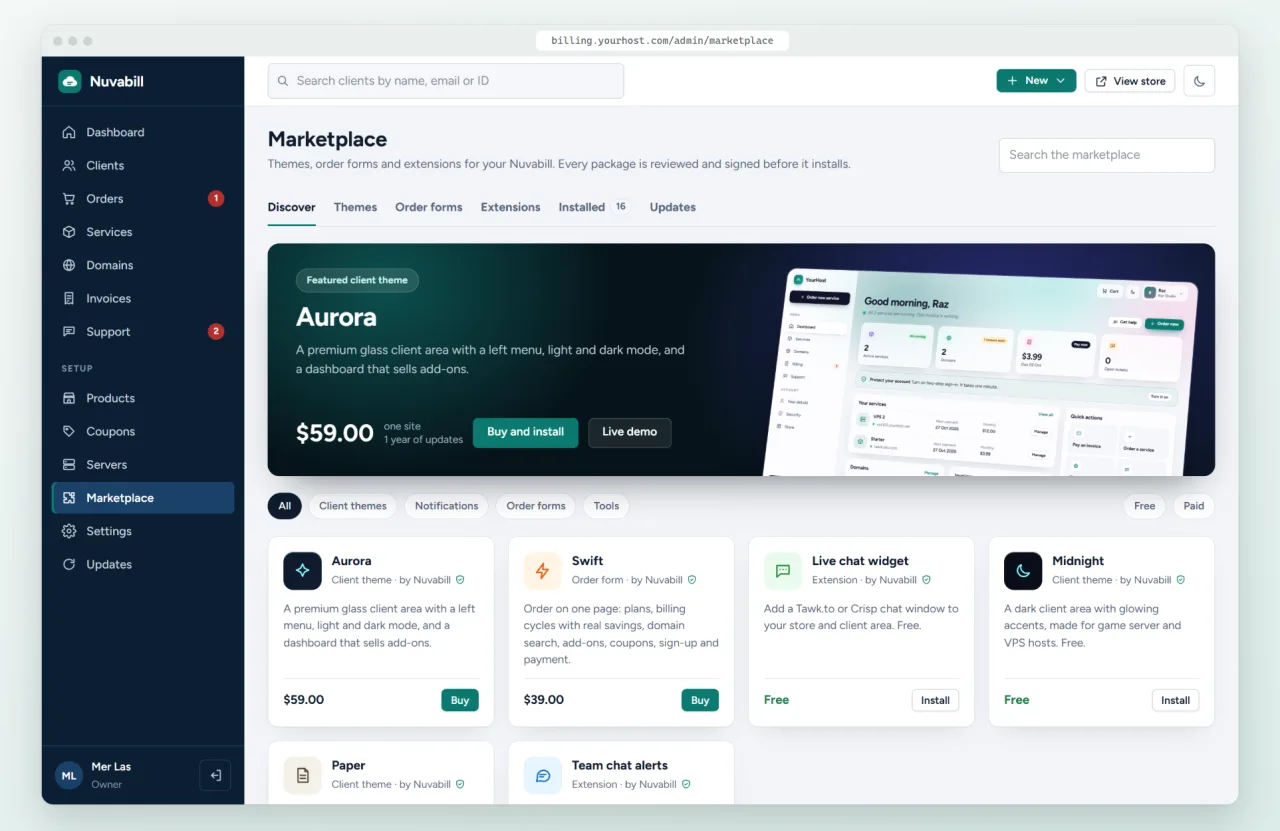
Install themes, order forms and extensions in one click from your admin area. Every package is reviewed and signed. Behind Cloudflare? Connect to the marketplace with one click. See the marketplace.
Upload, open the web installer and answer a few questions. Runs on shared cPanel hosting with one cron job. MySQL or SQLite.
Nuvabill follows every service for its whole life. You only step in when you want to.


No per-client fees and no monthly license. Host it on your own server.
WHMCS is mature and has a very large module library. Nuvabill is new, but it is free, fully open source and built on a modern stack. If you want readable code, no license fees and a clean mobile interface, Nuvabill is worth a try.
Yes. Nuvabill is open source under the AGPL-3.0 license. You can use it for your hosting business with unlimited clients and no monthly fee. The free edition shows a small "Powered by Nuvabill" link.
A server or hosting account with PHP 8.3 or newer, the usual PHP extensions, a MySQL, MariaDB or SQLite database and one cron job. It runs on normal cPanel shared hosting. See the install guide.
Yes. In Settings, Import first shows a dry run, then copies your clients (they keep their passwords), products and prices, services, domains, invoices, payments and support tickets straight from your WHMCS database. Blesta, FOSSBilling and Paymenter work the same way. The old system is only read, and you can run the import again just before you switch without making copies.
Nuvabill 0.7 is an early release, before 1.0. The billing flow, taxes, domains, control panels, payment gateways and marketplace are complete and tested, but test it with your own products, gateways and servers before you move real customers.
Yes. A White-label License removes it from your client area, invoices and emails for $49 a year per site. Enter the key under Settings → License. Test sites are free.
Nuvabill is made by RapidNet Ltd, a hosting company that built the billing system it wanted to use. You can support the work through GitHub Sponsors.
Open the demo as staff or as a customer. Click around, place an order, answer a ticket. Nothing you do can break it.